A clear view of crypto prices, without another dashboard. Keep your coins, charts, and preferred currency close at hand in Chrome.
Not available to install yet. The official listing will appear here.Take a closer look ↘
7 default assets / 3 display currencies / Your own sources
THE EXTENSION, AS IT IS01 / MARKET
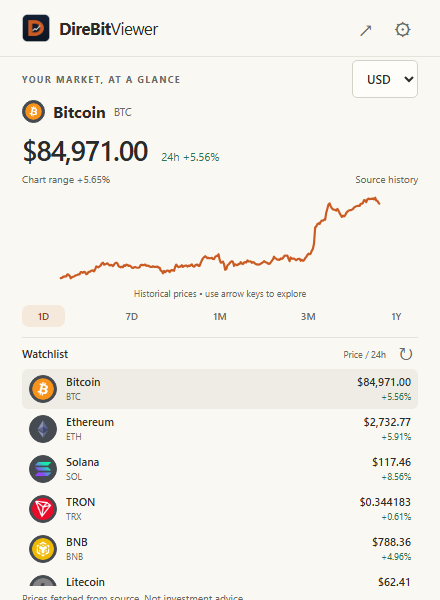
Actual extension interface. Captured prices are illustrative, not a live quote.
Start with seven. Make it your own.
TRX
BTC
SOL
ETH
BNB
LTC
XRP
Less noise. More perspective.
Everything you came to check. Nothing to trade.
Open the popup for a quick look, or give your watchlist room in the full-page view. DireBitViewer is for following market data — not managing funds.
01 / PERSPECTIVE
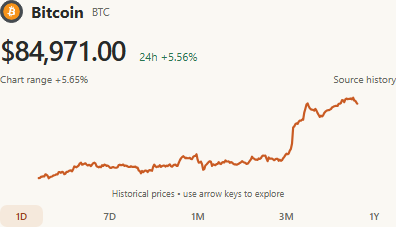
A day’s movement. A year’s context.
Switch between 1D, 7D, 1M, 3M, and 1Y chart periods. See the price in USD, EUR, or GBP, with history supplied by your selected provider.
History availability and refreshes depend on the source and its limits.
1D7D1M3M1Y
A focused chart, straight from the extension.
02 / YOUR SOURCES
Follow more than the default list.
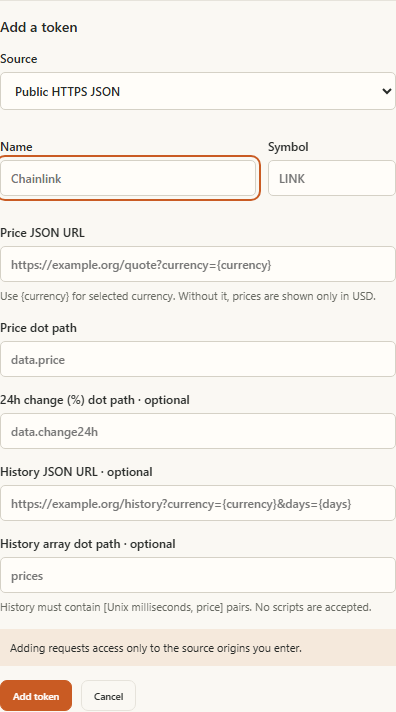
Add a coin by its CoinGecko ID, or connect a public HTTPS JSON source. Map a price field, add history when available, and choose what belongs on your watchlist.
Custom hosts require your explicit permission. Public URLs only — no private credentials in saved source URLs.
Actual custom-source settings. The form continues inside the extension.
03 / CLEAR BOUNDARIES
Your settings stay local. Your data sources are your choice.
No developer account. No telemetry. No access to your tabs or browsing history. Your watchlist and settings are stored locally in Chrome.
Market data and token icons still need network requests. Providers receive your IP address and request details; browser-managed image caches may be stored on disk.